Cloning a Video
Introduction
When clients feature multiple videos as part of a series or all from one conference, chances are most of the video record information, such as the tags, descriptions, thumbnails etc. remain the same from video to video. In these instances you can save time by cloning the video record rather than creating a new one from scratch for each video.
Instructions
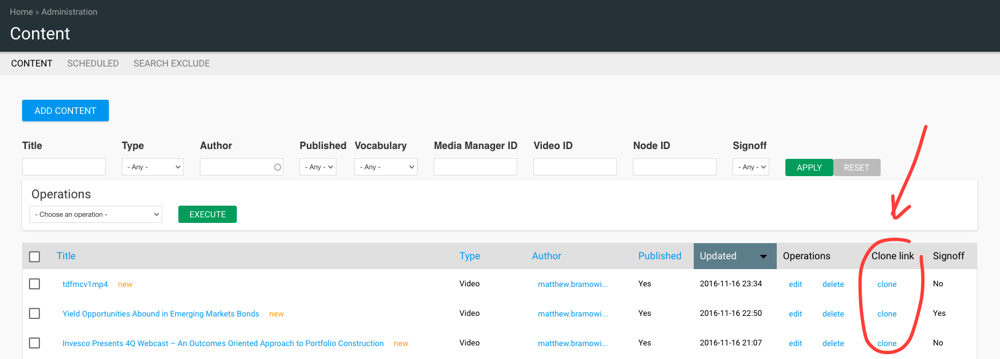
- Go to "Content" section.
- Once we found the video we want to clone on the list we just have to click on the "clone" button.
- The system will then take you to a page asking you to confirm that you wish to Clone the video record. Select confirm and a new video form will be auto-completed with the details from the original, only adding '
Clone of...' to the beginning of the title.
Tip
It is advisable to change the Media Manager video ID before saving the new 'cloned' record to ensure the two videos never go live with identical codes.
This would cause analytics to double up on views - i.e. if 'Video 1' and 'Video 2' both went live with identical Media Manager IDs, 'Video 1' got 10 views and 'Video 2' got 8 views in Analytics both videos would show they've had 18 views.
Tip
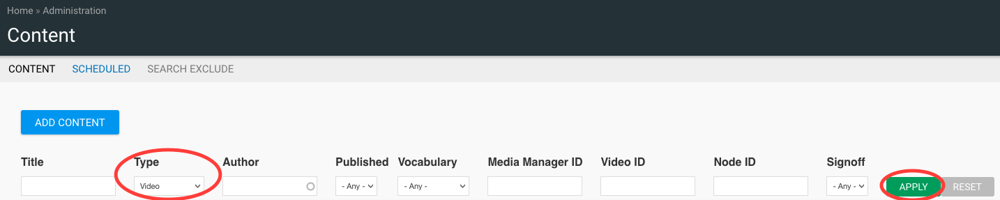
You can use the search filter to show only video content.