Channel Asset Guidelines
Asset TV
Use this guide to find out the basic requirements for graphics when creating a channel on Asset TV.
Templates
There are Photoshop and Sketch templates set out below which can be sent to customers should they require them.
- Download Photoshop template: Photoshop Template
- Download Sketch template: Sketch Template
Logo Image
The logo image is displayed in the channel directory.
- Logo should be supplied at 220 x 220 px, 72 dpi
- Background colour should be white
- Keep some blank space around the logo, at least 22 px around each side
- Accepted file types: JPEG, PNG
- Maximum file size: 512 kb
Channel Header Logo
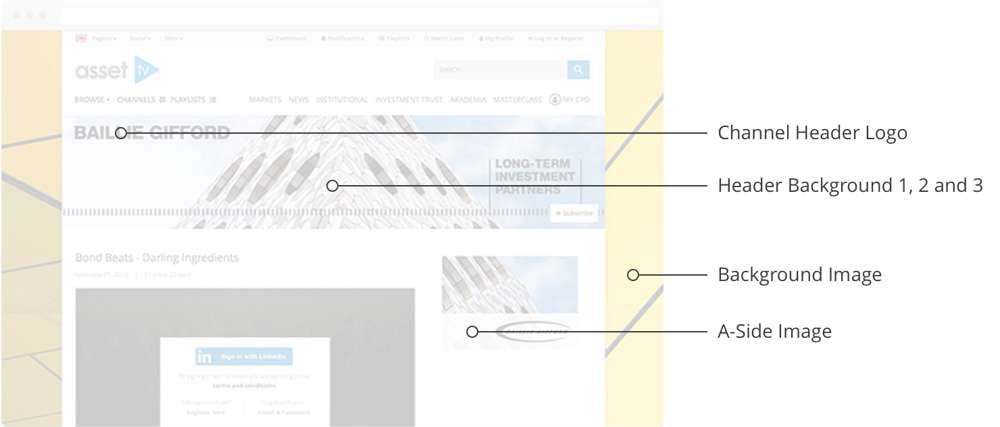
Overlaid on the header background on the channel page. Please see the illustration below for a visual of where the asset sits.
- Logo should be supplied at 496 x 120 px, 72 dpi
- Should be provided as a transparent PNG
- Header logo (or text, if preferred) must be aligned to the left image border
- Accepted file types: Transparent PNG
- Maximum file size: 512 kb
Header Background 1
Displayed at the top of the channel page at full screen size. Please see the illustration below for a visual of where the asset sits.
- Background should be supplied at 1202 x 200 px, 72 dpi
- Refrain from embedding text in your image as this can be distorted at different screen sizes
- Accepted file types: JPEG, PNG or Animated GIF
- Maximum file size: 512 kb
Header Background 2
Displayed at the top of the channel page on smaller screen sizes/tablets. Please see the illustration below for a visual of where the asset sits.
- Background should be supplied at 994 x 200 px, 72 dpi
- Keep all main content/imagery in the first 800 px (from the left) of the image. 194 px (from the right) of the image will be cut off at different screen sizes.
- Refrain from embedding text in your image as this can be distorted at different screen sizes
- Accepted file types: JPEG, PNG or Animated GIF
- Maximum file size: 512 kb
Header Background 3
Displayed at the top of the channel page on mobiles and tablets. This area can be too small for imagery so please use the company’s primary brand colour. This should be supplied as a HEX code and inserted under ‘Primary Channel Colour’. This HEX code will be put in place when ‘Header Background 3’ is left blank.
Background Image
Displayed in the gutters to the side of the page on larger screens. Please see the illustration below for a visual of where the asset sits.
- Background should be supplied at 1920 x 1080 px, 72 dpi
- Accepted file types: JPEG, PNG
- Maximum file size: 512 kb
A-Side Image
This is displayed in the right hand column of the page on larger screens. Please see the illustration below for a visual of where the asset sits.
- Image should be supplied at 360 x 780 px, 72 dpi
- You can make the height smaller if required, but not the width
- Accepted file types: JPEG, PNG or Animated GIF
- Maximum file size: 512 kb
Illustration of Assets
Insure TV and Investor TV
Use this guide to find out the basic requirements for graphics when creating a channel on Insure TV or Investor TV.
Logo Image
The logo image is displayed on the channel page and will be displayed at a size of 70 x 70 px. Please see the illustration below for a visual of where the asset sits.
- Logo should be supplied at 220 x 220 px, 72 dpi (allows for multiple uses with only one image)
- Background colour should allow the logo to be visible; for example is the logo is light, use a darker background to contrast and vice versa
- Keep some blank space around the logo, at least 22 px around each side
- Accepted file types: JPEG, PNG
- Maximum file size: 512 kb
Header Background 1
Displayed at the top of the channel page. Please see the illustration below for a visual of where the asset sits.
- Background should be supplied at 1920 x 250 px, 72 dpi
- Refrain from embedding text in your image as this will be cropped at different screen sizes
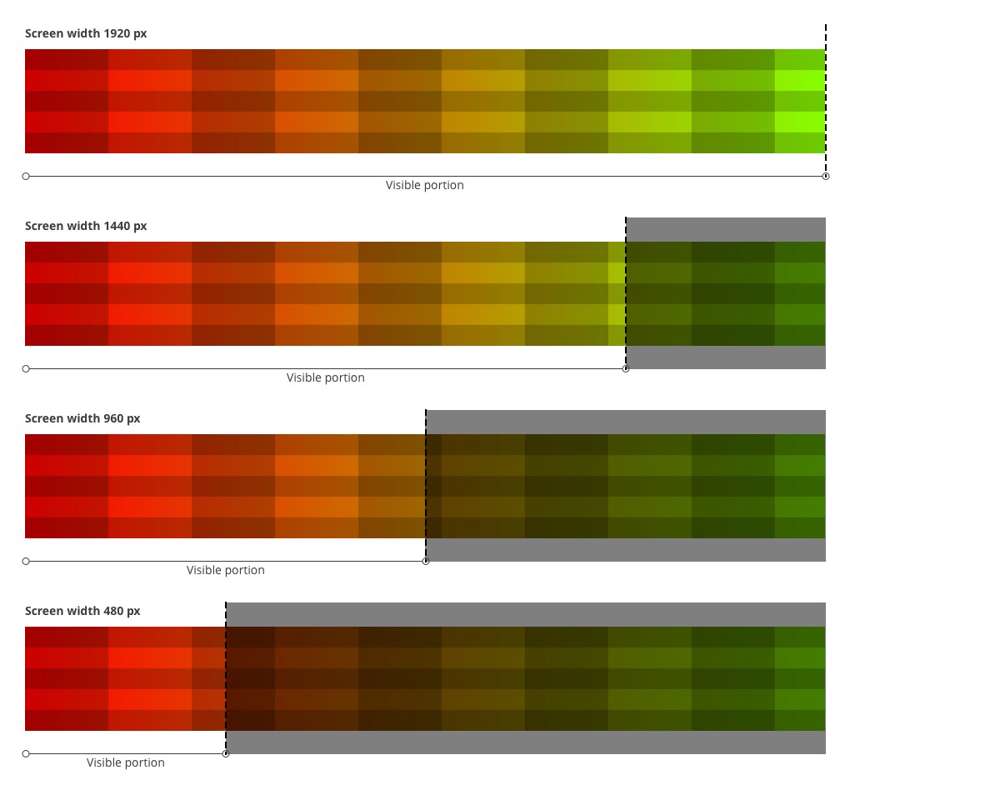
- The image is pinned to the left of the page so when the screen is narrower than the image width, the right side will be cropped off. Please see the illustration below for how this will work
- Accepted file types: JPEG, PNG or Animated GIF
- Maximum file size: 512 kb
Illustration of Assets
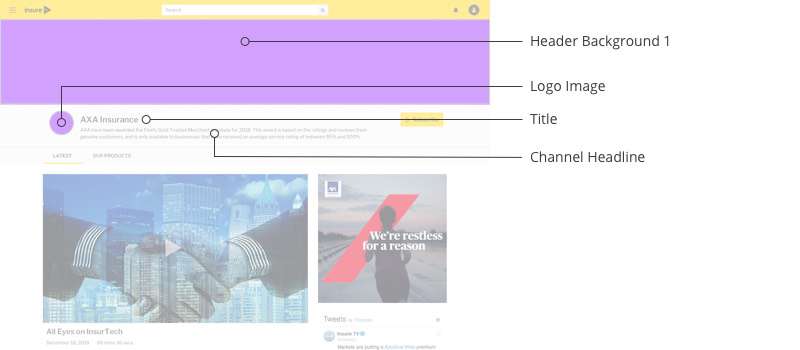
Illustration of Header Resizing
Unused Images
The following images are unused and will be removed from the admin interface:
- Channel Header Logo
- Header Background 2
- Header Background 3
- Background Takeover
- Primary Channel Colour
This is to better control to the look and simplify the implementation of the new style of channel pages.