Creating a Quiz
Some CPD requirements require users to complete a quiz following the viewing of a video. To accommodate this requirement you can link a quiz to video content. When the user watches the video and completes the quiz their CPD statement reflects this.
Quizzes are used to Verify a video the user has watched. Point values get added for the CPD they are accredited for, this allows you to add a point value in addition to duration earned. Points only appear on the downloadable statements for South Africa users.
General settings for your quiz
Before creating your quiz you should have been supplied the questions and answers for it. For South Africa you should've also been given a point value to attribute to the quiz. To create a quiz you can select Create new quiz from the Quizzes admin menu (Admin > Quizzes > Create new quiz), or you can create the quiz within the video page (this is recommended method as it links everything up automatically).
Before you start to create the body of the quiz you should set the score value in the Settings dropdown. When you tick the Quiz checkbox a field will appear allowing you to enter the score users will have added to their CPD record:
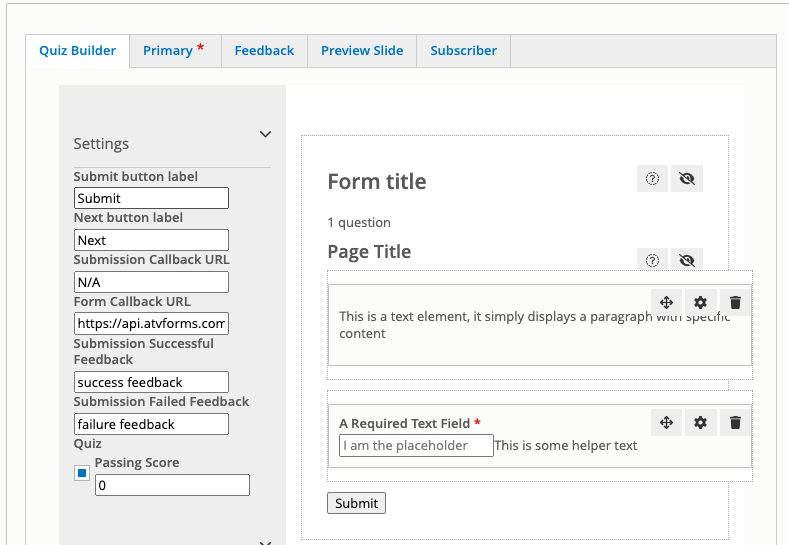
You can then set the title of your quiz. If you want to save the quiz and return to complete it later, you can now do so.
Info
When you start a quiz the builder will add a text field and required text field example. You can edit these if they can be used for your quiz, or simply delete them by clicking the bin icon.
Follow this guide to add and configure more field for your quiz.
Quizzes can be linked to a video as per the video documentation.