Linking Live Events and Event Registration Pages
Introduction
In order to comply with GDPR requirements you will need to link your Live Event to an Event Registration form. The Live Event Registration Form requests the users permission to share data with the event sponsors.
Instructions
To do this we have added a field under the title field for you to add your Reg form (simply start typing to find your form).
Note
Please note, the below guide mainly references Asset TV platforms, but the process is identical for Insure TV events too.
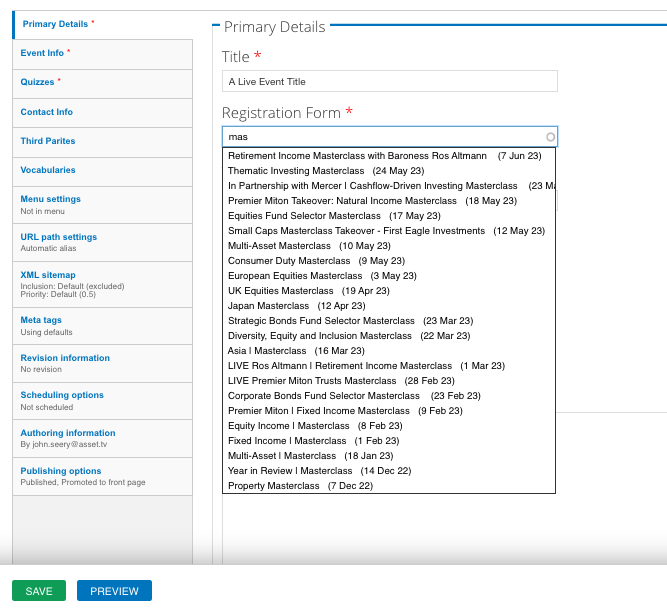
This is a required field, meaning you won't be able to save the Live Event without linking to a reg form. Therefore you will need to create the registration form first.
Note
If you have webforms with similar names you will need to take the node ID of your reg form. That way when you select the reg form on the autocomplete tool you can compare your node ID with the one shown in brackets next to your selection
The Event Registration forms informs registrants that sign up is taken as agreement to allow their information to be passed to event sponsors (3rd Parties).
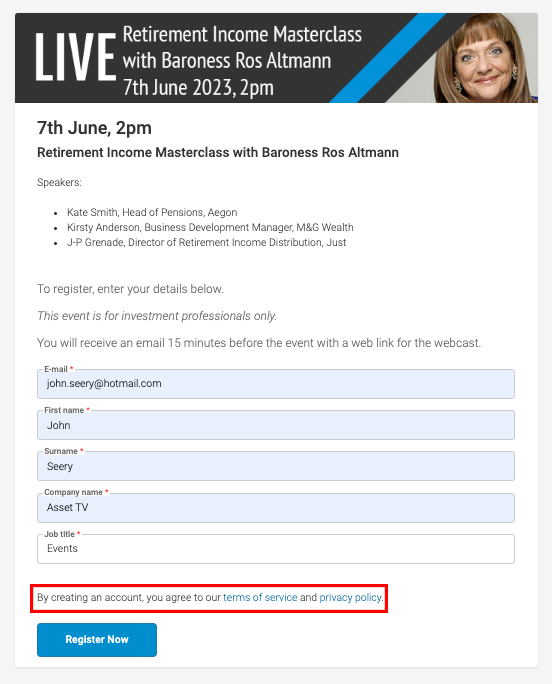
Site users who who don't pre-register for the event will be presented with a pop-up asking for them to agree to the terms too. Anyone who filled in the Event Registration form linked to your event will not be shown this pop-up.