Managing Glossary Branding
Finding the Glossary page
The Asset.tv / Assettv.com Glossary pages are managed very much like a channel page; so much so that to find and edit it you’re looking for a channel page.
As the page already exists in Titan and Hydra you’ll simply have to search on the Content page for Glossary.
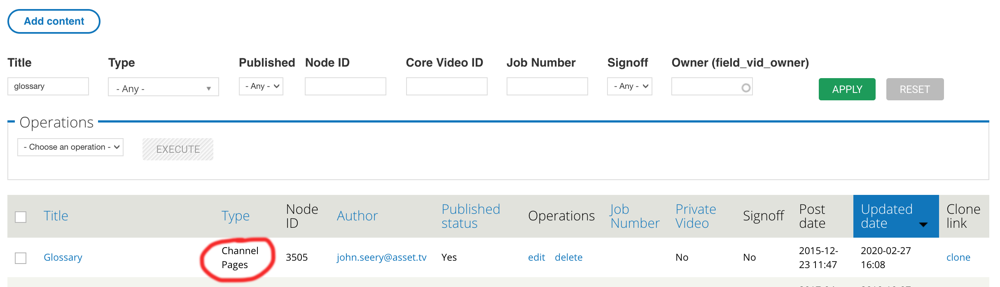
Info
As the page has already been set up you SHOULD NOT edit any of the details other than the Aside or Style elements you’d like to update.
The Aside tab
ASide elements will appear on the right hand side of the Glossary’s main page, as well as each terms' page. These are added and controlled in the same way as standard company channel pages.
Using the drop down you can select a number of ASide options:
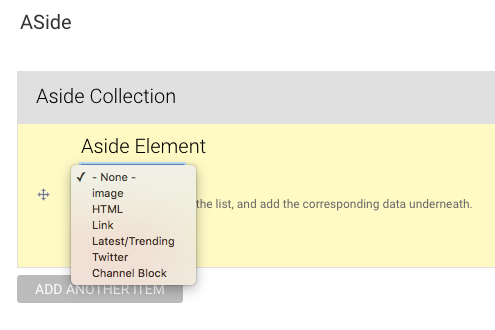
| Item | Description |
|---|---|
| -None- | No ASide element. |
| Image | A non-interactive image can be uploaded directly to Titan. |
| HTML | The most adaptable of the elements HTML will allow you to enter HTML code for dynamic elements such as animated MPUs or RSS feeds. |
| Link | A simple text link – you can enter a title (the text to appear as the link) along with the URL. |
| Latest/Trending | This block will feature quick links to the five latest videos published to the site along with a tab option to see the top five videos based on recent views. |
| Show a twitter feed either using the clients twitter handle, or if appropriate a particular hashtag. | |
| Channel Block | A block of featured video channels. |
The Style tab
The style tab allows you to customise the Glossary pages, allowing you to brand it for a sponsor both using their logo and corporate colours.
Each field allows you to upload an image which can be utilised for a header banner, the company’s logo (appears in the header) as well as background images. Each field explains any limitations (i.e. file type/size). You can refer to the separate Style Guide for a deeper breakdown of the file types, sizes and functions of each image.
You can also choose the channel’s primary colour to match a sponsor’s corporate colour.
The custom CSS field allows you to enter unique CSS stylings for these pages only.